In day-to-day technical documentation management, a persistent operational bottleneck is managing the lifecycle of incoming feedback and requests.
In practice, both sides experienced friction:
- External Stakeholders (CS, Solutions, Engineering): Often didn’t know which technical writer was responsible for a specific module. After raising a request in a channel, they had to chase progress across unstructured chat threads.
- The Technical Writing Team: Incoming feedback was scattered across dozens of active Slack threads, making context easily lost over time and frequently breaking the feedback loop when writers forgot to notify requesters after publishing updates.
To eliminate this operational friction, I built an automated workflow that transformed ad-hoc chat mentions into a standardized, closed-loop request management pipeline.
Implementation Path: Research, Automation, and SOP Rollout
I executed this project across three key phases: feasibility assessment → workflow design → internal and external SOP rollout.
1. Feasibility Assessment & Scope
Before building, I audited internal feedback patterns and evaluated technical feasibility. Drawing inspiration from internal developer bot patterns, I confirmed that leveraging Slack Event Subscriptions connected to a low-code automation engine (n8n) could create a centralized, zero-friction ‘docs inbox.’
2. Building the Closed-Loop Workflow on n8n
Using n8n as our orchestration engine, I designed a dual-perspective workflow that seamlessly aligns stakeholder ease of use with writer team tracking:
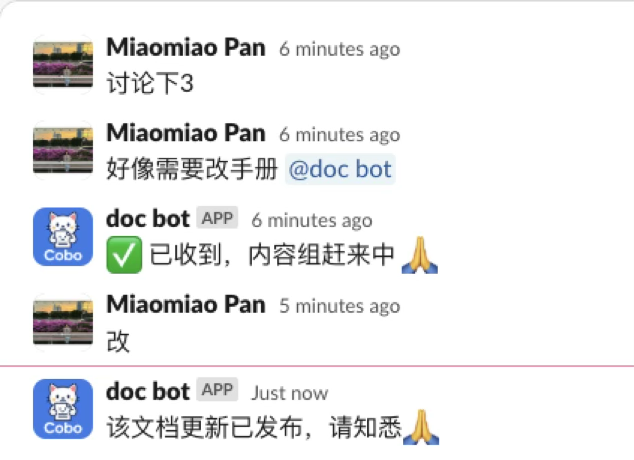
- Automated Capture & Acknowledgement (Stakeholder View): When a stakeholder mentions
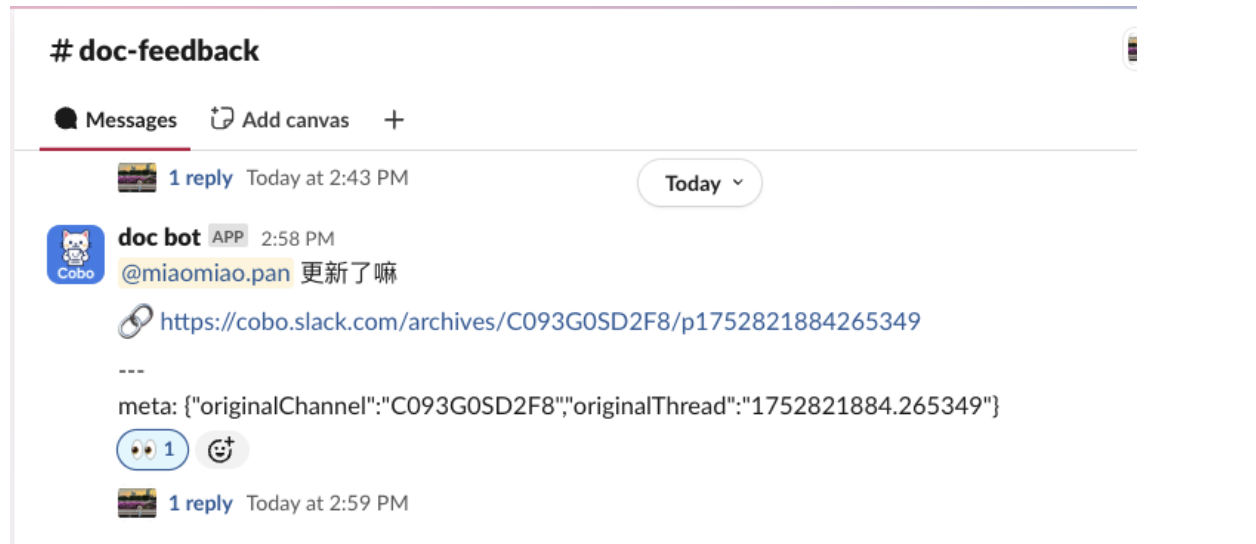
@doc-botin any Slack channel, the workflow immediately posts an inline confirmation in the thread (e.g., "✅ Received — the docs team is on it"). Simultaneously, it parses and forwards a structured payload (requester, original message permalink, timestamp, and context) to our dedicated internal channel,#tw-feedback-inbox. - Lightweight Status Coordination (Writer View): When a writer claims a request, they add an 👀 reaction to the forwarded message in
#tw-feedback-inboxto signal ownership and prevent duplicate effort. If a request requires no documentation changes, they react with ❌ to close and archive it. - Cross-Channel Auto-Closure: Once a doc update is published, the writer simply replies
@doc-bot okkwithin the internal inbox thread. The bot automatically locates the original stakeholder thread across channels and posts a publication confirmation (e.g., “This docs update has been published. Please take note 🙏”).
Stakeholder view: Submitting a request via @doc-bot and receiving an automated publication notice:
Writer view: Managing request intake and reaction-based status flow in #tw-feedback-inbox:
3. Standard Operating Procedure (SOP) Rollout
Tooling alone doesn’t change habits, so I actively managed organizational adoption:
- Internal Alignment: Onboarded all technical writers to the
#tw-feedback-inboxworkflow, standardizing ticket claiming and reaction-based status conventions. - External Alignment: Communicated the new flow to cross-functional stakeholders, establishing
@doc-botas the single canonical entry point for all documentation requests and status tracking, eliminating unstructured private DMs.
Results & Business Value
- Eliminating the Feedback Black Hole: Created 100% traceability for cross-team documentation requests. Feedback is now centrally managed, structured, and audit-ready.
- Low Operational Overhead: Leveraged native Slack reactions and cross-channel threading to achieve complete lifecycle tracking without forcing teams to adopt heavy, high-friction tools like Jira for minor doc fixes.
Future Scope: This automation framework is designed to scale. Next steps include automated request categorization (e.g., tagging API reference vs. user guide requests) and quarterly feedback analytics to continually drive content strategy with real operational data.